Inconsistent corrugated flexo print quality is one of the most persistent problems we see in corrugated box production — and one of the most misdiagnosed. What makes it particularly difficult is the timing: the problem does not appear at startup. It develops gradually, after the machine has been running for thirty minutes to an hour, and by the time it becomes visible, the process has already been shifting for some time.
The shift starts well. Print looks exactly as it should — clean solids, sharp text, stable registration. The first few hundred sheets come off the line without issue.
Then things begin to change. Not suddenly. Gradually.
A solid area develops uneven density. Fine text loses its edge. Registration drifts slightly. The ink on the sheet feels less dry than it did at startup.
Nothing was changed. Same board. Same ink. Same machine settings. Same operator.
So what happened?
The First Thing We Check Is Usually Not the Ink
When print quality starts drifting mid-run, the instinct is to adjust what is most visible: ink viscosity, dryer temperature, impression pressure, or line speed.
These adjustments sometimes provide short-term relief. But if the root cause lies elsewhere in the system, the problem returns — often worse than before.
In our experience, the ink is rarely where the drift starts. By the time a visible defect appears on the sheet, something else in the system has already moved. The ink is showing you the result. It is not telling you the cause.
This pattern is explored in more detail in Why Your Printing Quality Problems Are Often Misdiagnosed as Ink Issues — worth reading before making any ink-side adjustments.
What We Usually See After 30–60 Minutes of Production
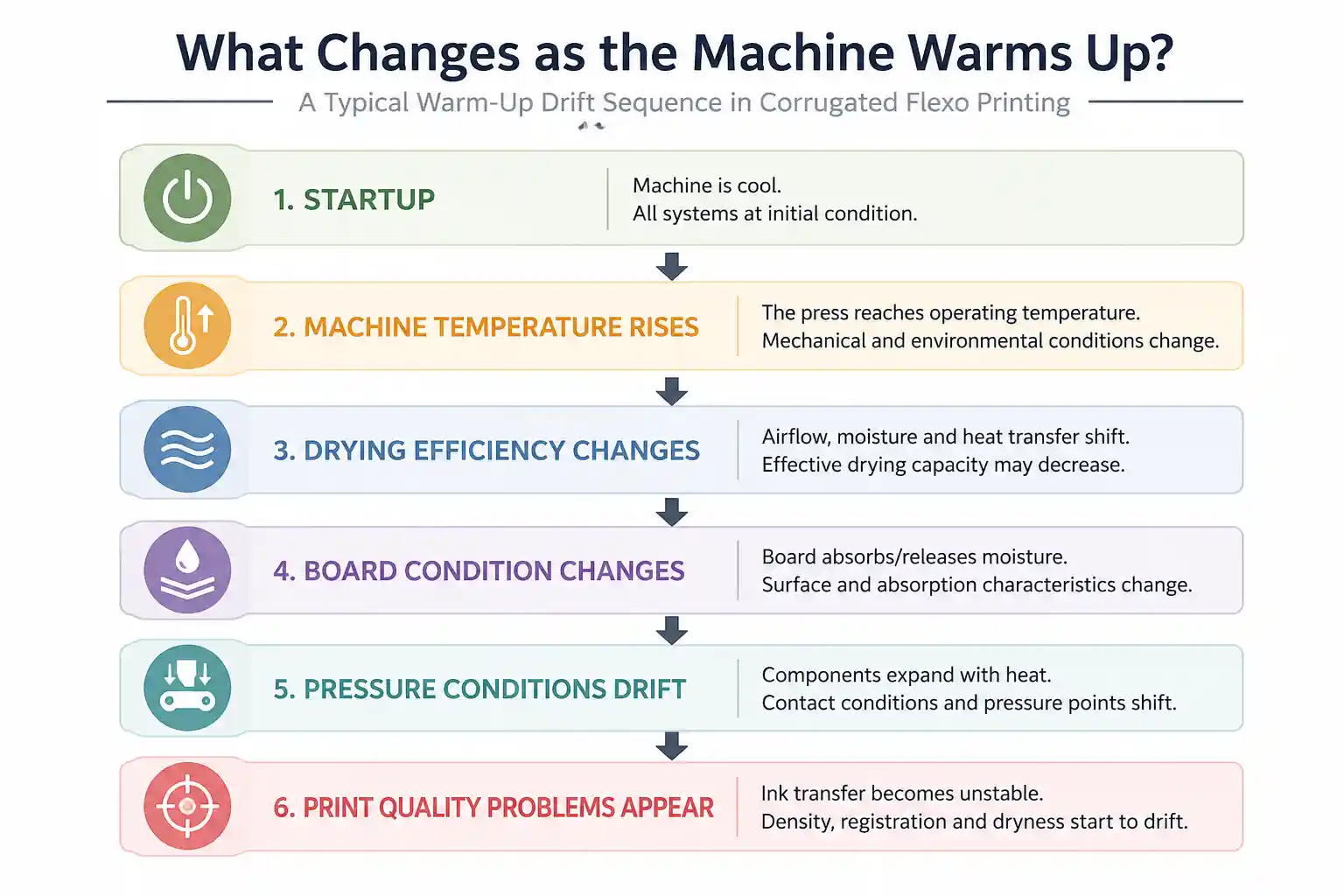
A corrugated flexo press does not run exactly the same way after an hour of production as it does during the first few minutes of a shift. Several things shift as the system moves through its thermal range. In our experience, they tend to drift in a fairly consistent order — and knowing that order is usually what gets you to the answer faster.
Drying Is Usually the First Thing That Starts Drifting
This is where we look first — and it is where the problem starts in most of the cases we see.
At startup, the drying section is cool and the line is still reaching equilibrium. As production continues, conditions inside the drying system change in ways that do not always show up on the control panel:
- Airflow distribution becomes less uniform as the system heats up
- Moisture accumulates inside the drying section
- Heat transfer efficiency decreases
- Effective drying capacity may no longer match the current line speed
The panel temperature may look unchanged. The actual result on the sheet can be very different.
Field check: Take a sheet directly from the exit of the last print unit and lightly rub the printed surface. Any tackiness means the drying system is already falling behind — regardless of what the panel says.
For a closer look at drying-related defects and what most operators miss, see Why Ink Is Not Drying in Flexo Printing — And What Most People Miss.
Board Starts Behaving Differently After Startup
Even from the same pallet.
Corrugated board absorbs and releases moisture in response to the environment around it. As a job runs, the board sitting in the feed stack is exposed to heat, airflow, and humidity changes near a running machine. By thirty to forty minutes in, the board being fed may behave quite differently than what was on the feeder at startup.
This usually messes with:
- Ink absorption rate and depth
- Surface fiber strength
- Printed density and color consistency
- Drying behavior and ink adhesion
Two consecutive sheets, same settings, different output. In a lot of cases, this turns out to be a board condition issue.
Pressure Drift During Warm-Up
Mechanical components expand as the press reaches operating temperature. Even small dimensional changes alter the contact conditions between the anilox roll and plate, the plate and substrate, and the feed rolls and board.
Individually, these shifts are small. Together, they are enough to move ink transfer volume, dot gain, and registration outside of acceptable tolerance — without anyone touching a setting.
Other Variables Begin to Drift
Beyond the print units, we also see drift in vacuum performance, sheet feed consistency, drive synchronization, and vibration levels. None of these is dramatic on its own. In combination, they add up.
A Real Example
We recently discussed this issue with a corrugated box plant running BC double wall board. The first 20–30 minutes of every shift looked fine. Then solids started appearing slightly mottled and operators noticed the ink felt wetter than it had at startup.
The crew tried the usual responses: increased ink viscosity, raised dryer temperature, reduced line speed. Each change helped briefly. The problem kept coming back.
When we checked the sheet directly — not the panel readings, the physical sheet — the ink was still tacky after exiting the drying section. That already told us enough. The drying system was no longer keeping up once the machine reached normal operating temperature.
Once airflow distribution and drying balance were corrected, quality stabilized and held through the rest of the shift.
Understanding the Chain Reaction
Drying is usually the first thing we see starting to fall behind.
After that, everything else is just reaction. Ink starts feeling tacky, transfer becomes unstable, and people begin chasing settings — adjusting ink, tweaking pressure, slowing the machine down. Each change makes sense in isolation. But none of it addresses what actually moved first.
By the time the defect is significant enough to stop the line, several adjustments have already been made — making it much harder to identify where the drift started.
A related pattern occurs during extended production runs. Why Flexo Print Quality Drops During Long Runs — And What to Check First covers how cumulative drift behaves differently from warm-up-related drift, and how to tell them apart.
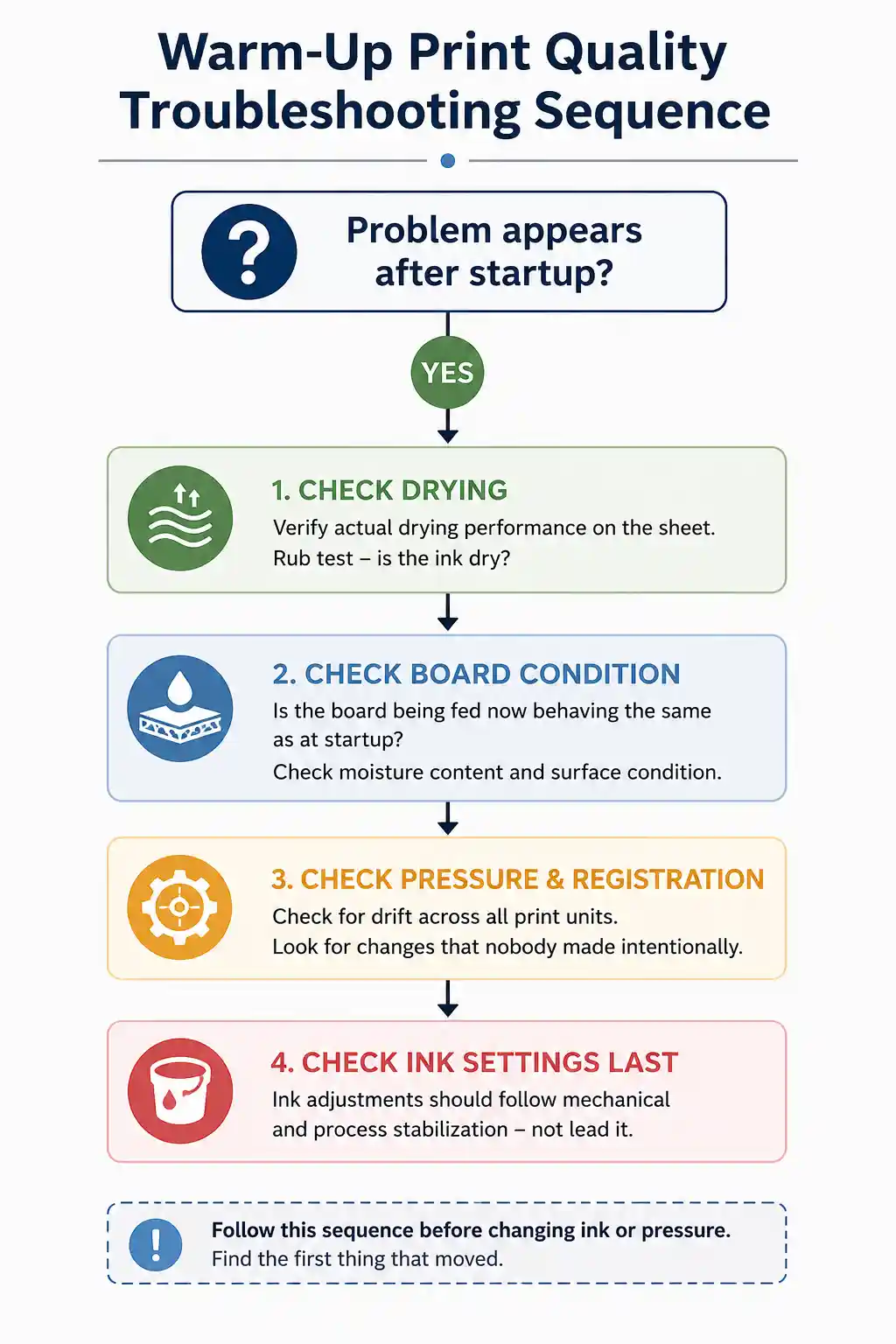
What We Usually Check First
If corrugated flexo print quality starts deteriorating after the machine has been running for a while, this is the sequence we follow before touching ink or pressure settings:
Step 1 — Confirm the pattern Did quality hold at startup and begin drifting after 30–60 minutes? That timing matters.
Step 2 — Check actual drying performance on the sheet Not the panel reading. The physical sheet. Rub it. Is the ink dry?
Step 3 — Evaluate board condition Is the board being fed now behaving the same as at startup? Check moisture content and surface condition.
Step 4 — Review pressure and registration Check for drift across all print units. Look for changes that nobody made intentionally.
Step 5 — Then look at ink Ink adjustments should follow mechanical and process stabilization — not lead it.
Summary
If a corrugated flexo line prints well at startup but quality begins drifting later, don’t assume the ink suddenly changed.
In our experience, drying balance, board condition, and pressure stability are almost always worth checking before touching ink settings. Find the first thing that moved, and the rest of the problem usually becomes much easier to solve.
Related Reading
- Why Flexo Print Quality Drops During Long Runs — And What to Check First
- Why Ink Is Not Drying in Flexo Printing — And What Most People Miss
- Printing Misregistration Gets Worse After Speed Increase — What Should You Check First
For further reference on flexographic process standards, see the Flexographic Technical Association (FTA) and the Technical Association of the Pulp and Paper Industry (TAPPI).
Have a Print Quality Issue That Appears After Startup?
If your corrugated flexo print quality is stable at startup but begins to drift after 30–60 minutes of production, feel free to compare notes with us. Just send:
- Board type
- Speed when it starts drifting
- What you have already tried
That’s usually enough for us to at least see where to start looking.
Cangzhou Jeytop Industrial Group Co., Ltd.
Website: jeytop.com
WhatsApp: +86 15230792110
Email: liyong@jeytop.com