Uneven ink coverage in corrugated printing is one of the most common print quality problems in corrugated box production. The symptom is easy to see, but the cause is often much harder to identify.
One side of the sheet prints darker. The center looks heavier than the edges. A certain area consistently appears lighter than the rest of the print.
The job, board grade, ink, and machine settings may all appear unchanged.
Yet the print density across the sheet is clearly different.
What makes uneven ink coverage in corrugated printing difficult to troubleshoot is that the visible defect is often not where the problem starts.
In many cases, teams immediately focus on the ink system. Ink viscosity is checked. The anilox roller is inspected. Doctor blade pressure is adjusted.
Sometimes that solves the problem.
But in many cases, it doesn’t.
The ink is where the defect appears. It is not always where the defect originates.
The Ink Gets Blamed First — Almost Every Time
When operators see uneven ink coverage across a corrugated sheet, the first assumption is usually that something is wrong with the ink transfer system.
Common reactions include:
- Adjusting ink viscosity
- Cleaning the anilox roller
- Replacing doctor blades
- Increasing impression pressure
- Reducing machine speed
Sometimes one of these actions improves print quality. Sometimes the improvement lasts only a few minutes. Then the problem returns.
Uneven ink coverage in corrugated printing is often the result of a system imbalance rather than a single component failure — and fixing one component rarely addresses the underlying condition.
The print is showing the symptom. Something else may be creating the condition that produces it.
This troubleshooting logic is similar to what we discussed in Why Your Printing Quality Problems Are Often Misdiagnosed as Ink Issues and Sudden Color Variation During Printing — Ink Problem or Printing System Issue?.
Stop Looking at the Ink First. Look at the Pattern First.
In practice, this is usually where troubleshooting becomes much easier.
Before adjusting ink settings, ask a different question:
Why is one area of the sheet behaving differently from another?
When density variation consistently follows a position across sheet width, the issue is often related to system balance rather than ink formulation.
The pattern itself usually provides the first clue.
For example:
- Left side darker than right side
- Center heavier than both edges
- One specific zone repeatedly prints lighter
- Density variation always appears in the same position
These patterns often point toward airflow distribution, board condition, mechanical contact, or localized ink transfer differences.
In other words, the problem is usually happening across the width of the machine — not inside the ink bucket.
What Usually Creates Uneven Ink Coverage Across Sheet Width?
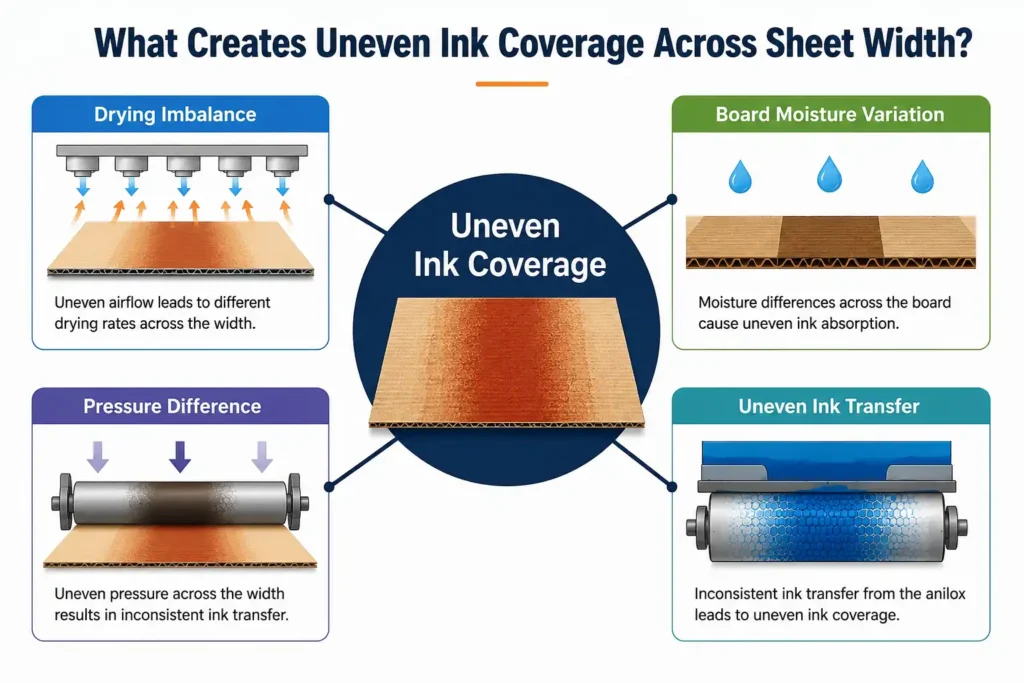
The Sheet Is Not Drying Equally Across Its Width
This is one of the first things our engineers look at during troubleshooting.
Drying systems are designed to distribute airflow evenly across the machine width. In reality, airflow distribution is not always perfectly balanced.
Over time, factors such as air duct contamination, uneven airflow delivery, fan performance variation, and drying section wear can create differences across the width of the sheet.
When one side receives more effective airflow than another, evaporation rates change. The result may appear as uneven ink coverage, even though the real issue originates in the drying section.
Field check: If density variation roughly follows airflow positions or drying zones, drying performance should be checked before changing ink settings.
For more on drying-related print quality issues, see Why Ink Is Not Drying in Flexo Printing — And What Most People Miss.
The Board Is Not Behaving the Same Across the Width
Across different plants and machine configurations, we see board moisture variation affect print density more often than operators expect. Even within the same stack, moisture condition may not be uniform across the sheet.
This can happen because of storage conditions, stack positioning, environmental exposure, and variations in board conditioning.
Different moisture levels affect ink absorption, surface fiber behavior, print density, and drying performance. As a result, the same print settings may produce noticeably different density levels across the sheet.
In a lot of cases, what appears to be an ink problem turns out to be a board condition issue.
One Side May Simply Be Printing Harder Than the Other
Mechanical contact is rarely identical across the full machine width.
As production continues, slight variations may develop due to cylinder deflection, uneven impression contact, plate wear, machine warm-up effects, and mechanical alignment drift.
More contact pressure generally transfers more ink. Less pressure transfers less. The resulting density variation often follows machine geometry rather than anything the operator intentionally changed.
This is particularly common on wider corrugated flexo press installations and during extended production runs.
Sometimes the Ink Delivery Itself Is Uneven
Sometimes the issue actually is within the ink transfer system.
Localized variation can occur due to partial anilox cell clogging, uneven doctor blade pressure, ink circulation inconsistencies, or localized contamination.
Unlike a general ink problem, these defects usually affect specific areas across the machine width. The position of the variation often remains consistent from sheet to sheet — and that consistency is an important clue.
From a machine design perspective, uneven ink coverage across sheet width is rarely a single-component failure. Across different corrugated flexo press installations, we repeatedly see the same pattern: the system imbalance appears before any individual component shows obvious wear or failure. That is why component-level fixes — cleaning the anilox, changing the blade, adjusting viscosity — often provide only temporary relief.
A Real Example
We recently discussed a case with a corrugated box plant that was experiencing uneven ink coverage across the sheet width.
The print consistently appeared darker on the drive side and lighter on the operator side.
The first assumption was that the anilox roller needed cleaning. The team cleaned it. No change.
Then ink viscosity was adjusted. For a short period, the result looked slightly better. The next production run looked exactly the same.
After that, impression pressure was adjusted. Again, little changed.
The team had already adjusted ink twice, changed pressure settings, and cleaned the anilox before the airflow issue was checked. Each adjustment seemed reasonable at the time, but none addressed the real imbalance in the system.
Eventually, attention shifted away from the ink system. When airflow distribution across the drying section was checked, a noticeable imbalance was found between the two sides of the machine.
Once airflow distribution was corrected, print density became significantly more uniform across the sheet.
The ink was showing the problem. The drying system was creating it.
That sequence — ink adjusted, problem unchanged, cause found elsewhere — is something we see more often than it should happen.
Why Adjusting Ink Often Makes the Situation Worse
This is one of the most common troubleshooting mistakes.
When one area prints lighter than another, the natural reaction is to increase ink volume or raise pressure.
The problem is that you may be correcting the symptom rather than the cause.
If airflow is already uneven and additional ink is introduced, the slow-drying side may become even less stable. If mechanical pressure is already uneven, increasing overall impression contact often exaggerates the difference rather than correcting it.
You are fixing the visible result. The system creating the result remains unchanged.
In many cases, that is why repeated adjustments gradually make print quality less stable instead of more stable.
How We Usually Troubleshoot Uneven Ink Coverage
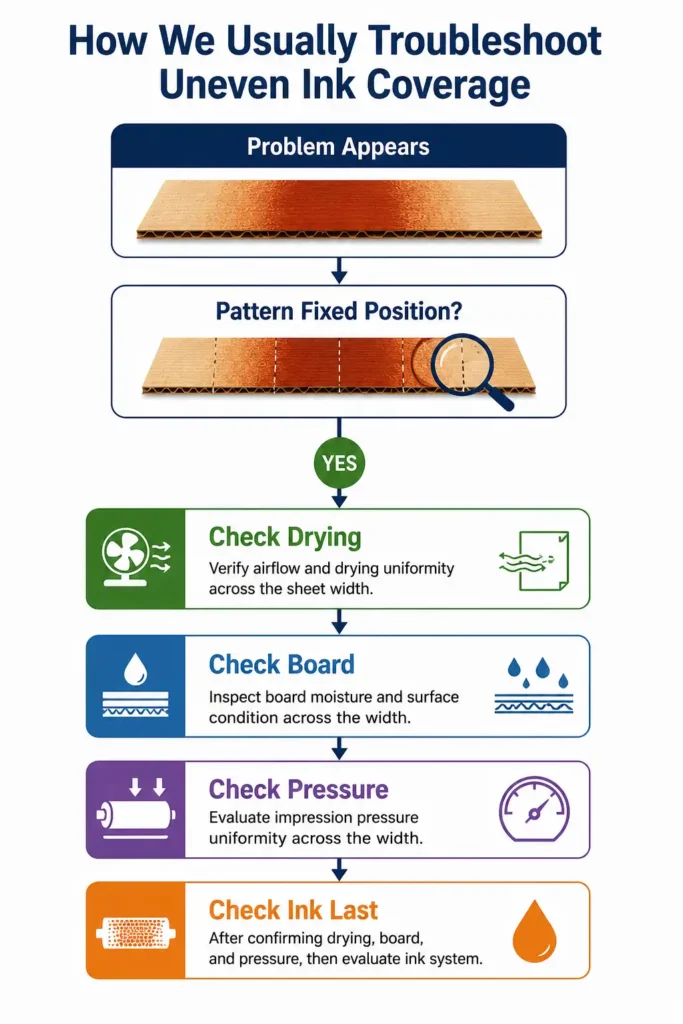
Before touching the ink system, we usually start with the pattern.
Does the Pattern Stay in the Same Position?
If the variation consistently appears in the same location, look at drying distribution, mechanical pressure, and board moisture profile. These issues often create fixed-position variation.
Does the Pattern Move Around?
If the position of the variation shifts across sheets or develops gradually over time, look at ink circulation, temperature variation, feed consistency, and process stability. Moving defects often indicate changing process conditions.
Does It Follow the Board or the Machine?
If the variation stays in the same machine location regardless of board source, the machine is usually the better place to start. If the variation follows the board itself, board condition deserves closer attention. This is often the fastest way to narrow down the root cause.
Once these three questions are answered, check drying performance on the physical sheet — not just the panel reading. Take sheets from the left, center, and right of delivery and lightly rub the printed surfaces. If drying is uneven across the width, address that before adjusting viscosity, pressure, or ink volume.
Only after drying, board condition, and mechanical stability have been evaluated do we typically focus on the ink system itself.
For more on this troubleshooting approach, see Most Printing Problems Are Not Ink Problems.
Summary
Uneven ink coverage in corrugated printing is rarely just an ink problem.
In many cases, the pattern across the sheet already reveals where the system is becoming unstable.
Before adjusting ink, ask a different question:
Why is one side of the system behaving differently from the other?
In our experience, drying distribution, board moisture variation, mechanical pressure differences, and localized ink transfer issues are far more likely to explain uneven ink coverage than the ink itself.
From a press manufacturer’s point of view, this kind of defect is less about ink control and more about how evenly the system behaves across its working width.
Find the imbalance first. The print quality problem usually becomes much easier to solve.
Related Reading
- Why Ink Is Not Drying in Flexo Printing — And What Most People Miss
- Most Printing Problems Are Not Ink Problems
- Sudden Color Variation During Printing — Ink Problem or Printing System Issue?
- Why Your Printing Quality Problems Are Often Misdiagnosed as Ink Issues
For further reference on flexographic process standards, see the Flexographic Technical Association (FTA) and the Technical Association of the Pulp and Paper Industry (TAPPI).
Have an Uneven Ink Coverage Problem You Can’t Explain?
If uneven ink coverage keeps appearing across your corrugated sheets and normal ink adjustments are not solving it, feel free to compare notes with us.
A few details are usually enough to identify where the process starts drifting:
- Where the variation appears (left, center, or right)
- Whether the pattern stays fixed or moves
- What adjustments have already been tried
Cangzhou Jeytop Industrial Group Co., Ltd.
Website: jeytop.com
WhatsApp: +86 18833771152/15230792110
Email: liyong@jeytop.com