
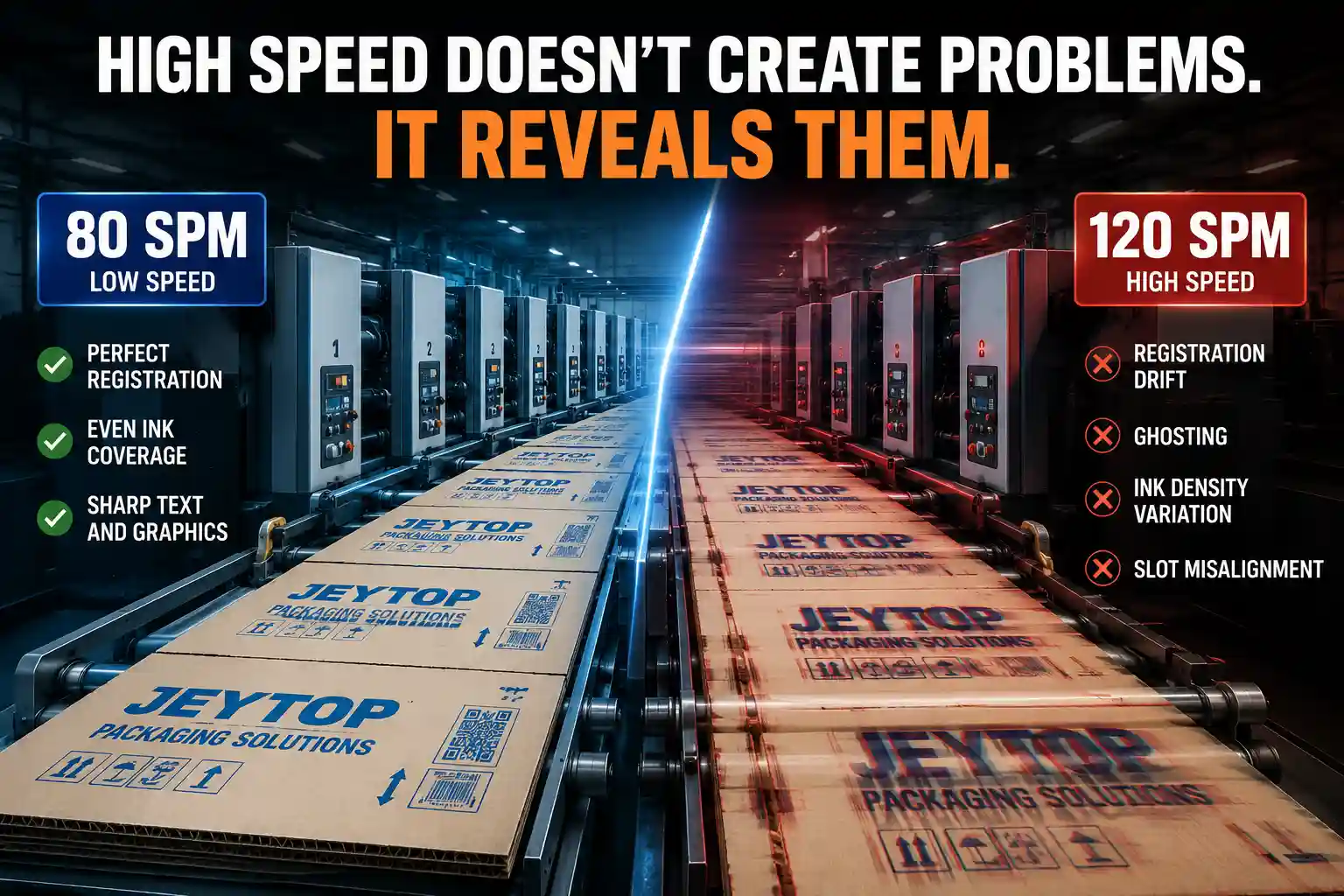
If you’ve worked in a corrugated box plant long enough, you’ve probably seen this exact scenario. Same board, same plates, same ink settings. At 80 sheets per minute, print registration is sharp, ink coverage is even, and the run proceeds without a hitch. Then production pushes the speed up to hit a tight deadline, and everything falls apart.
Registration drifts gradually across the sheet. Ink density shifts from side to side. Fine text gains a faint halo, and even slot positions start to wander.
Press operators scramble: adjust anilox pressure, wash the ink train, re-register plates, tighten feed belts. Half an hour of tweaking only makes things worse. Then they drop the speed back down — no other changes — and every issue vanishes. Print quality is perfect again.
The immediate reaction is always the same: the machine can’t handle high speed. But few stop to ask:Why print quality drops at higher speeds,is speed actually causing the problem, or is it just making existing flaws impossible to ignore?
Why Speed Always Gets the Blame
It’s an easy conclusion to draw. Problems appear the second speed goes up, and disappear the second it drops. That clear cause-and-effect pattern makes speed feel like the root cause.
But it’s not. Speed is just an amplifier.
It doesn’t create defects. It exposes hidden weaknesses already present in the system.
At lower speeds, every part of the flexo printing slotting machine operates with a wide margin for error. Small deviations — a tiny feed position offset, minor pressure fluctuation, a slight delay in ink delivery — get absorbed by the system. They never show up on the finished board, so no one ever notices them.
Crank up the speed, and that margin shrinks dramatically. Every cycle happens faster, every contact window gets shorter, and small, hidden mismatches grow into visible print defects.
Think of it like riding a bicycle. At a slow pace, a slightly wobbly wheel or loose handlebar barely registers. Pick up speed, and that same small issue turns into a noticeable shake. The speed didn’t create the problem — it just made it impossible to miss.
Why does print quality drops at higher speeds?
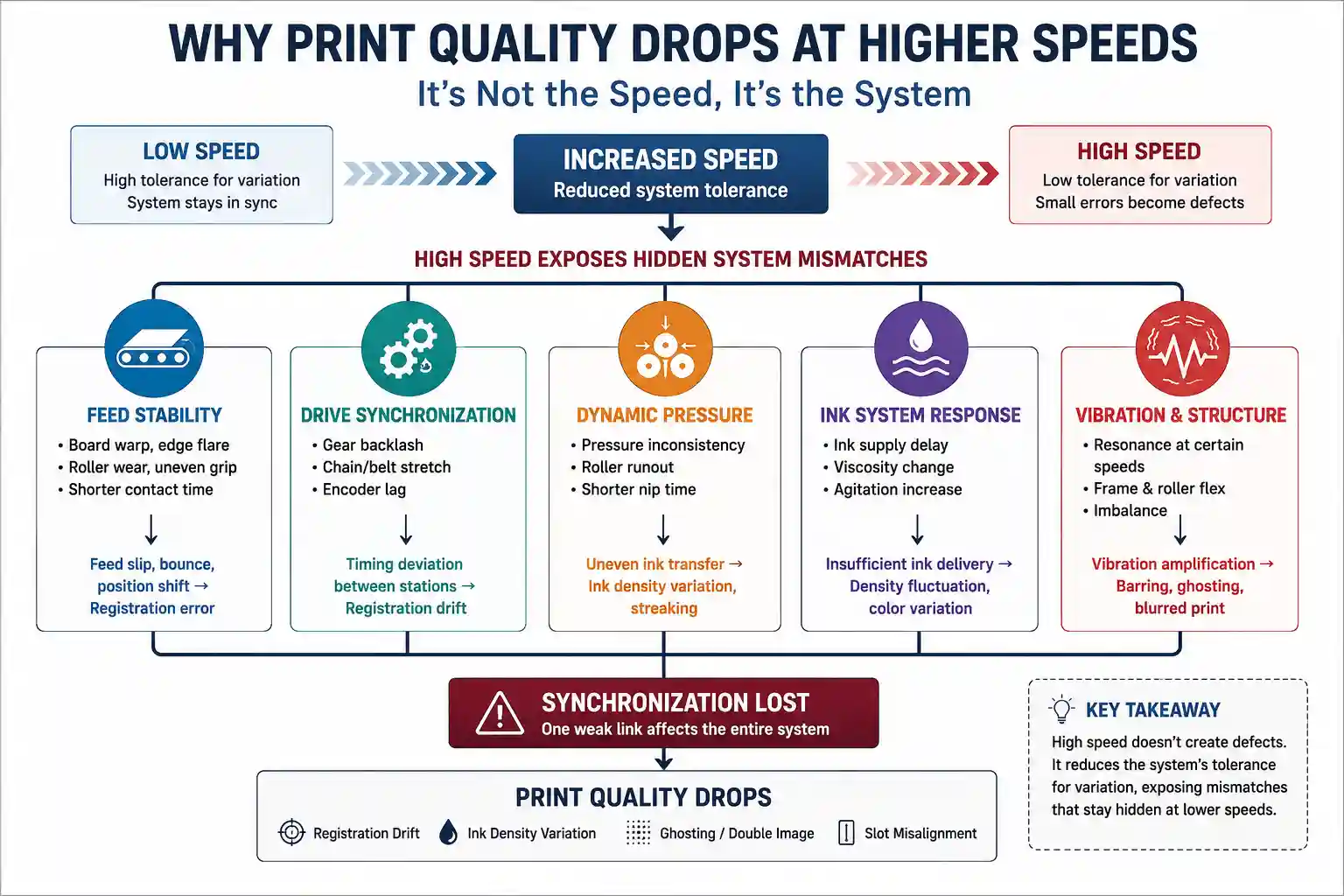
Print quality usually does not decline because higher speed creates defects. Higher speed reduces the system’s tolerance for hidden mechanical, feeding, pressure, and ink delivery variations, making existing synchronization problems visible.
What High Speed Actually Exposes
In corrugated flexo printing, higher speeds don’t create new system failures. They reveal mismatches that were already there, hidden by the tolerance of slower production.
The Flexographic Technical Association (FTA) also confirms that consistent print quality relies on synchronization across the entire press system, rather than isolated adjustments to individual components. As production speed increases, maintaining that synchronization becomes exponentially more demanding.
Mechanical Clearance and Structural Flexibility
Every machine has built-in tolerances from manufacturing and assembly — tiny gaps in bearings, gear backlash, minor deflection in frames and rollers.
At low speeds, dynamic loads are low. Centrifugal force and impact forces stay minimal, and these small gaps are held steady by static pressure and component weight. A few thousandths of a millimeter of roller runout or gear lash rarely affects print quality.
As speed climbs, centrifugal force multiplies, and cyclic impacts hit more frequently. Those tiny gaps get pulled and pushed with every rotation, amplifying into visible issues: drifting registration, hazy edges, and consistent banding. The higher the speed, the less tolerance the system has for structural movement. These flaws always existed — they just fell below the threshold of what affects print quality at slower speeds.
Dynamic Pressure and Contact Time
It’s common to assume printing pressure is a fixed value, regardless of speed. That’s never the case in practice.
At low speeds, the board spends more time in the nip between the anilox, plate, and impression roller. Small pressure variations get averaged out over a longer contact window, so ink transfer looks uniform. Even slightly uneven pressure gets smoothed over by extra contact time.
At higher speeds, that contact window shrinks dramatically. Minor pressure inconsistencies show up immediately as uneven ink density — darker where pressure is higher, lighter where it’s lower. Many operators try to compensate by adding more overall pressure, but that only makes the unevenness worse, and accelerates plate wear. What looks like an ink problem is almost always a pressure consistency problem that couldn’t keep up with faster cycles.
Board Feed Stability
Corrugated board is not a perfectly rigid, flat material. Natural warp, uneven edges, and slight caliper variation are normal, and they rarely cause issues at low feed speeds.
At slower rates, feed rollers have plenty of time to grip and flatten the board, and it travels through each print unit in a stable, consistent position. Minor warp gets pressed out before it reaches the first plate.
Faster feed speeds shorten that grip time. Warp, flared edges, and inconsistent board stiffness get amplified: the board can skip, shift, or bounce slightly as it feeds, and that position shift carries through every print unit as registration error.
Most operators chase the problem by adjusting print registration, but the mismatch starts long before the board ever reaches the first print station.
Ink System Response
The same logic applies to the ink delivery system. At low speeds, the ink train has plenty of buffer to smooth out small supply delays. At higher speeds, faster cycling means the system can’t replenish ink fast enough to keep consistent density, and viscosity shifts from increased agitation become more noticeable.
Vibration Resonance
Every component on a machine generates small vibrations as it runs — motors, gears, rollers, feed mechanisms all have their own natural frequency. At low speeds, these frequencies are scattered and mostly absorbed by the machine frame.
Every machine has a speed range where these separate frequencies align and amplify each other. When production hits that range, combined vibration shows up as ink barring, ghosting, or blurred print. Push past that speed range, and the issue often eases again. The vibration was always present — it just never reached a level that impacted print quality.
Manufacturer’s Observation
Most high-speed printing defects show up in the print section, but the mismatch rarely starts there.
Across corrugated plants worldwide, we’ve found that more often than not, it’s peripheral systems — feed, drive, ink supply — that fall out of sync first at higher speeds, dragging down overall print performance.
That’s why our engineers never start by adjusting ink or pressure on site. We start by looking at synchronization across the entire line.
A Real-World Example
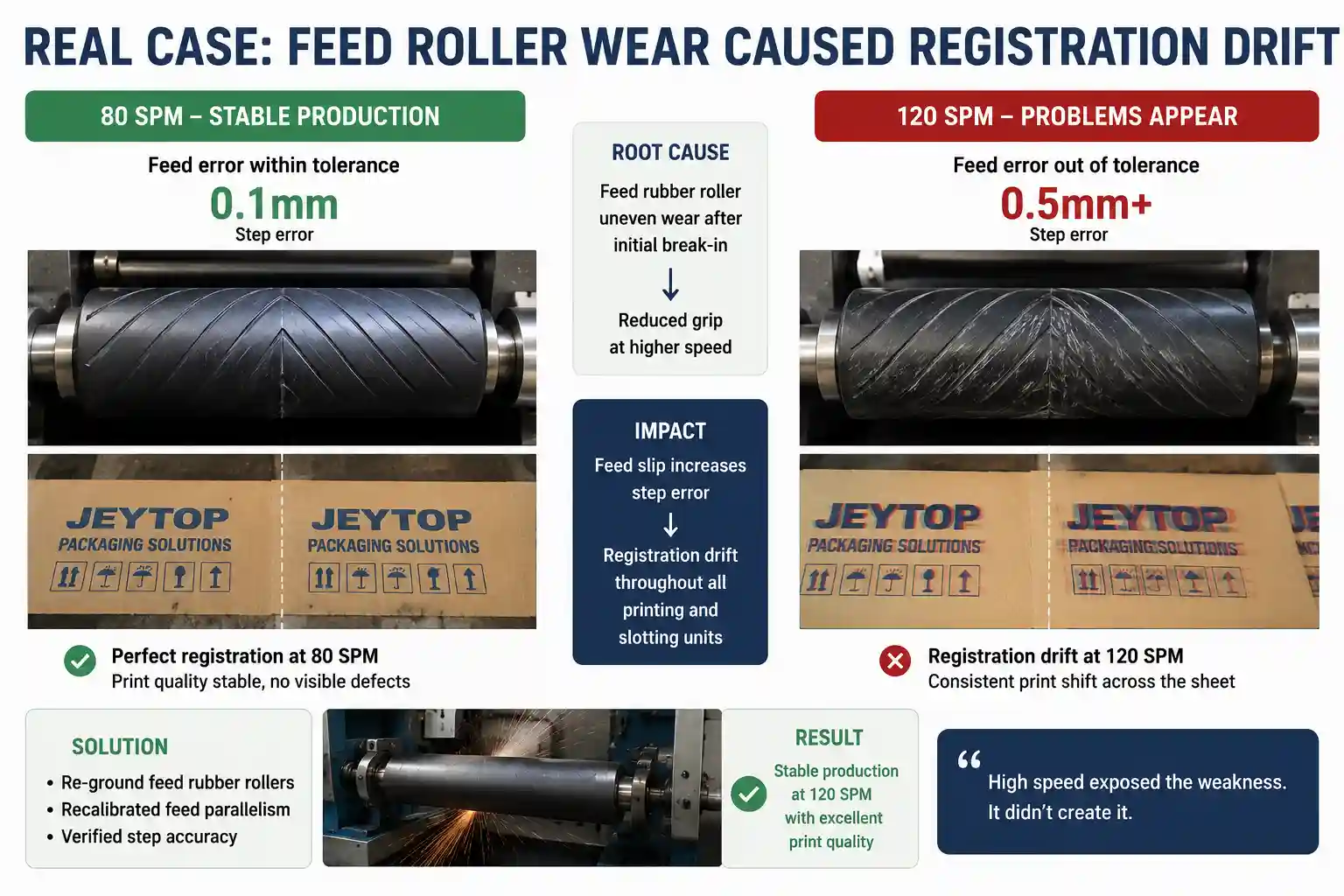
On one customer commissioning project, we worked with a mid-sized corrugated plant running a 3-color flexo printing slotting machine. It ran perfectly at 80 sheets per minute — sharp registration, uniform ink, no issues at all. When they pushed production to 120 sheets per minute to meet a surge in orders, problems hit immediately: second and third color registration drifted, side-to-side ink density varied, and fine text had a slight double image.
The plant’s team focused entirely on the print section first. They stripped and re-mounted plates, swapped to a higher-grade water-based ink, and installed new doctor blades. After two days of adjustments, nothing had improved. Eventually the team started to suspect the machine frame itself lacked the rigidity for high-speed production, and even reached out to discuss structural upgrades.
When our engineer arrived on site, he didn’t touch the print units first. He ran feed accuracy tests at three different speed grades, and traced the issue back to the feed rollers.
After initial break-in, the feed rubber rollers had developed uneven wear. At 80 sheets per minute, grip was still strong enough that step error stayed within 0.1mm — unnoticeable for print registration. At 120 sheets per minute, shorter contact time caused minor slippage, and that step error grew to over 0.5mm. That small feed offset carried through every print and slotting station downstream.
After regrinding the rollers and recalibrating feed parallelism, the machine ran consistently at 120 sheets per minute with print quality identical to what they saw at 80. It ran stable for three full shifts without issue.
High speed exposed the weakness. It didn’t create it.
How We Diagnose “Speed-Related” Print Issues
As a corrugated printing machine manufacturer, our approach to these problems is different from on-site troubleshooting. The first thing we do is not slow the machine down, and not start tweaking print settings. It’s to identify which subsystem is falling out of sync first.
Every speed-related print defect comes down to lost system synchronization. Feed, printing, ink supply, drive, and frame all operate in synchronization at lower speeds. As speed increases, the subsystem with the least tolerance drops out first, and the whole line’s print quality suffers.
We typically run tests at set speed increments, and map how the defect behaves: does it get steadily worse as speed climbs, or does it appear suddenly at a specific threshold? Is it consistent in a fixed position, or random and uneven? Different patterns point to different root causes.
Gradual registration drift usually traces back to feed or drive synchronization. Shifting ink density points to ink system dynamic response. Consistent, repeating barring points to vibration. We never waste time tuning only the print section when the root cause is somewhere else entirely.
At the end of the day, a machine’s stable top speed is never determined by the fastest rotating component. It’s determined by how well every subsystem works together at that speed. The subsystem with the smallest margin is always the one that sets the real limit.
Jeytop Perspective
High-speed flexo printing does not create problems. It simply reveals the true performance limits of a system, sooner than slower production ever could.
From a machine design perspective, the reliable top speed of a flexo printing slotting machine is never defined by a single component’s maximum RPM. It is defined by how well every subsystem stays aligned and synchronized under dynamic operating conditions.
Stable high-speed printing is not about how fast a machine can run. It’s about how well the entire system stays in sync.
Related Articles
If you’re troubleshooting print quality issues, these articles may also help:
- Why Ink Is Not Drying in Flexo Printing — And What Most People Miss
- Uneven Ink Coverage in Corrugated Printing — What Actually Causes It?
- Why Corrugated Flexo Print Quality Drops After the Machine Warms Up — And What Usually Changes First
Frequently Asked Questions
Why does print quality decrease at higher printing speeds?
Because higher speed reduces the tolerance for small system variations, exposing existing synchronization problems.
Can increasing printing pressure solve poor print quality?
Usually not.
Higher pressure may temporarily improve ink transfer, but often increases plate wear and hides the real cause.
Which subsystem should be checked first?
Feed stability.
Most registration problems originate before the board reaches the first printing unit.
Is vibration always caused by poor machine quality?
No.
Many vibration problems only occur within specific resonance speed ranges.
Need Technical Support?
Every corrugated plant is different.
If you’re experiencing registration drift, ink inconsistency, or unstable print quality at higher production speeds, our engineering team can help identify which subsystem is limiting your performance.